Steam, redesigned.
Prism rebuilds the Steam store, the Community, Steam's own window and your library into one clean, fast design, and every game page takes its colours from the game's own art. One installer sets it all up in the Steam client.
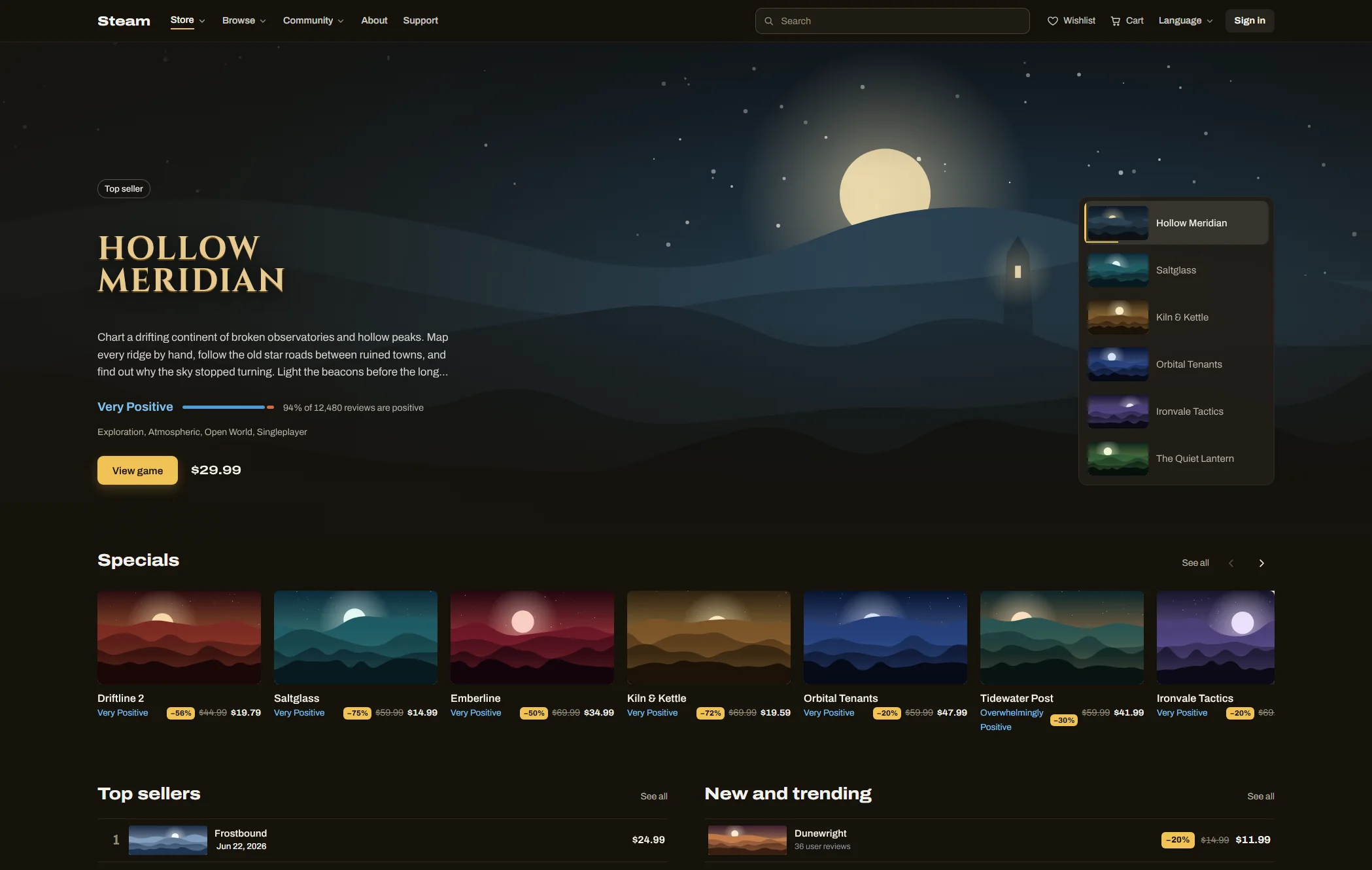
Real Prism screenshots. Game art and titles are placeholders.
The same front page, before and after.
Drag the handle. Left is the stock Steam store: boxed carousels and small type. Right is the same page with Prism.
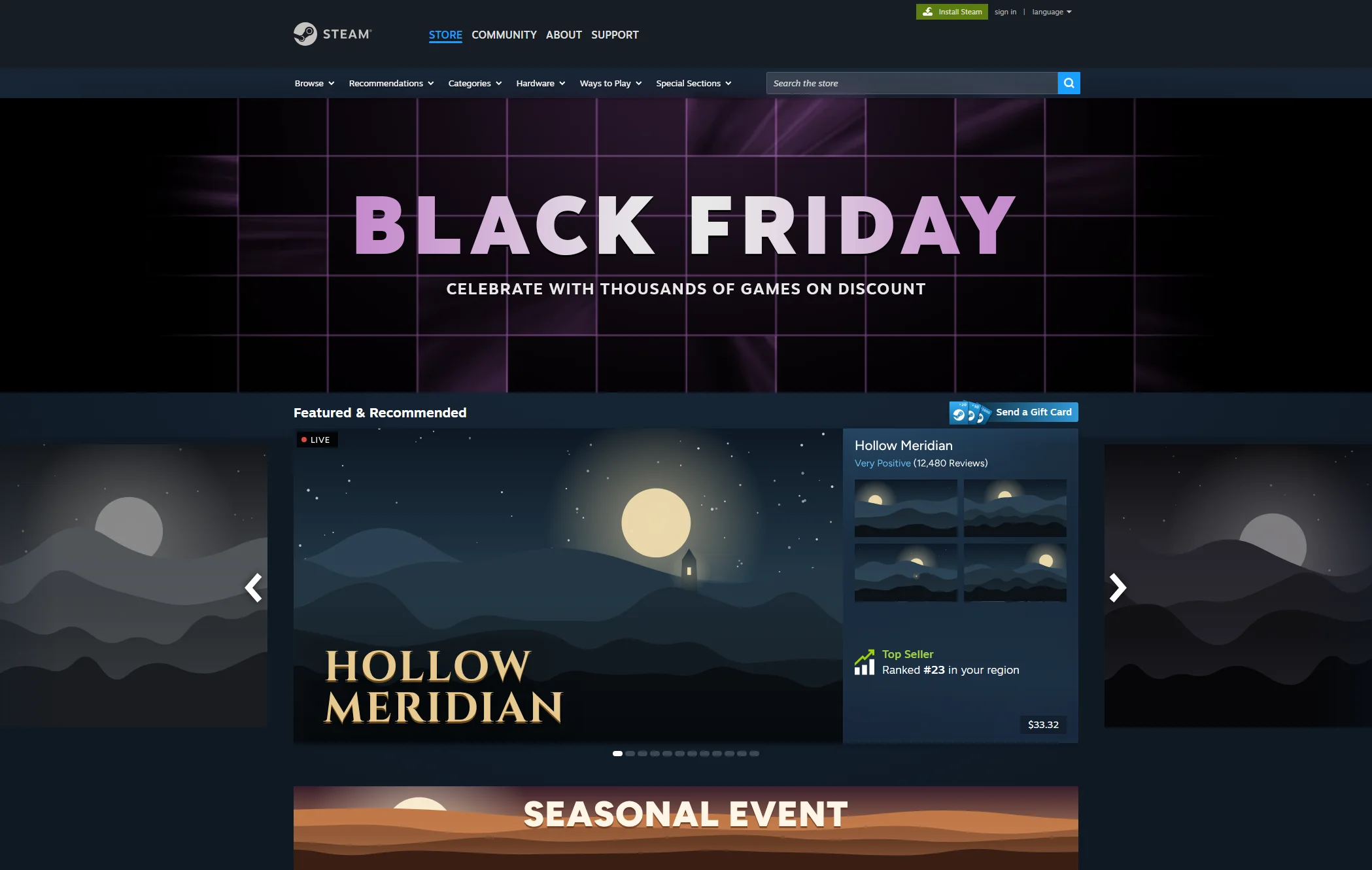
Every store page, not just one.
The front page, game pages, search, reviews, bundles, wishlist, charts, hubs, curators and more all share one design.
All of Steam, not just the store.
In the Steam client, Prism also covers the Community, Steam's own window and your library, all in one design.
Steam Community
Profiles get a banner from their background, a row of stats and showcases laid out for what they hold. Friends, groups, discussions, inventory, trade offers, the Workshop, the Market and the Points Shop all switch to Prism's look before they paint.
Only the look changes. Posting, trading, selling and subscribing work exactly as before.
Steam's own window
The top of the window becomes one slim bar with Steam's menus, the Store, Library and Community tabs and your name. The drop-down and right-click menus and the downloads strip along the bottom match it.
Each part has its own switch in Prism's settings.
Your library, with Library+
Library+ replaces the library's Home page, every game page, the game list on the left and the Downloads page. Covers and banners load straight away, even for newer games Steam has no library art for.
Steam view on any game page brings Steam's own page back instantly.
Built in
Haggle
Compares a game's Steam price with official stores and key resellers, right on its store page.
MarketLens
Shows the cheapest reseller price on each Community Market item, every marketplace on hover, and a Sets view.
Ban checker
VAC, game, trade and community bans on your friends list, for anyone you look up, and on a watchlist that rechecks itself.
Player counts
A live count of people playing on every game page, plus today's peak and Steam rank for the hundred most played.
Each built-in add-on has its own switch in Prism's settings.
Small things, done properly.
No flash of Steam's layout
Prism hides Steam's page before it paints and shows its own as soon as the page is ready.
Colours from every game
Each game page takes its palette from the game's own art, so no two pages look quite the same.
Reviews where you read
Scores, a month-by-month chart, filters and every review sit on the game page. No jumping out to another page.
Room for your other extensions
Buttons and panels from extensions like SteamDB's stay visible. Prism moves each one into the matching place in its layout.
Switch back any time
Every Prism page has Switch to Steam's layout at the bottom, and Prism remembers your choice for the store and the Community.
Fails safe
If Steam changes a page Prism can't read, you get Steam's own page within a second and a half, not a broken one.
One price. Yours to keep.
No subscription. Buy once and every update is included.
One-time purchase. Every future update included.
- The store, the Community, Steam's window and your library (Library+)
- Haggle, MarketLens and the Ban checker built in
- Prism Setup installs everything in one step
- One license key for up to 2 PCs
- All future versions, installed for you in the Steam client
- Full refund within 14 days if it doesn't work for you
Checkout opens soon. Email support@prismforsteam.com to be told when it's live.
Checkout is handled by Polar, which also takes care of sales tax. Your license key and download appear right after you pay and arrive by email too. Lost them? Find my license.
Steam client version: Windows 10 or 11. Browser version: desktop Chrome, Edge or Brave.
In the Steam client
- Download Prism Setup from your purchase email and run
PrismSetup.exe. - If Windows says it protected your PC, click More info, then Run anyway.
- Paste your license key and press Install. Setup closes Steam, installs Millennium, Prism and Library+, and starts Steam again.
- That's it. Prism updates itself from then on.
In Chrome, Edge or Brave
- Download the Prism extension from your purchase email and unzip it.
- Open
chrome://extensionsand turn on Developer mode. - Click Load unpacked and choose the Prism folder.
- Open the Steam store and paste your license key when Prism asks.
Questions
Something else? Email support@prismforsteam.com, or use Report a bug inside Prism.
Does Prism change my Steam account or purchases?
No. Prism changes how Steam looks on your screen. Buying, gifting, trading and wishlisting still go through Steam itself, exactly as before. Checkout, sign-in and account pages are left alone.
What does Prism Setup install?
Millennium (the open-source plugin loader for the Steam client, downloaded from its official release and checked before it's copied), Prism and Library+. Extendium is optional, for running SteamDB's extension. Setup only touches your Steam folder, and it backs up Millennium's settings before changing them.
Why does Windows warn me about Prism Setup?
Prism Setup isn't signed with a paid code-signing certificate yet, so Windows shows "Windows protected your PC" the first time. Click More info, then Run anyway. Setup's source code comes with it if you want to check it.
Is it safe to use?
Prism doesn't touch your games, game files or anything anti-cheat looks at, and it never asks for your Steam login. It restyles Steam's pages and window.
How many PCs can I use it on?
One license key works on up to 2 PCs. If you replace a PC, email support and we'll free up a slot.
How do updates work?
In the Steam client, Prism downloads new versions by itself and asks you to restart Steam. Run Prism Setup again to update Library+. The browser extension shows a banner when a new version is out.
Will my other Steam extensions still work?
Yes. Extensions that add buttons or panels, such as SteamDB's, keep working. Prism moves each addition into the matching place in its own layout.
Can I switch back to the normal Steam look?
Any time. Every Prism page has Switch to Steam's layout at the bottom, Library+ has Steam view on every game page, and Prism Setup has a Remove option that takes Prism and Library+ out completely.
I lost my license key.
Go to Find my license and enter your purchase email. We'll send your key and download links again.
What if it doesn't work for me?
Use Report a bug inside Prism or email support and we'll help. If it still doesn't work, you get a full refund within 14 days of purchase. See the refund policy.
Is Prism made by Valve?
No. Prism is an independent project and isn't affiliated with or endorsed by Valve.